Q1.
Take a look at the form below and write the HTML needed to recreate it exactly—using the right semantic tags, form controls and label associations. Your version should collect:
- A “Personal Details” heading
- Username and password fields
- An address textarea
- A phone number input
- A “Role” radio group (Student, Teacher, Professional, Other)
- A date-of-birth picker
- A “Technical Skills” checkbox list
- Submit and reset buttons
Make sure each control uses the correct <input> type, is wrapped in a <label> (or paired via for/id) and the form structure follows best practices for accessibility and semantics.
A screenshot of the example is shared below: 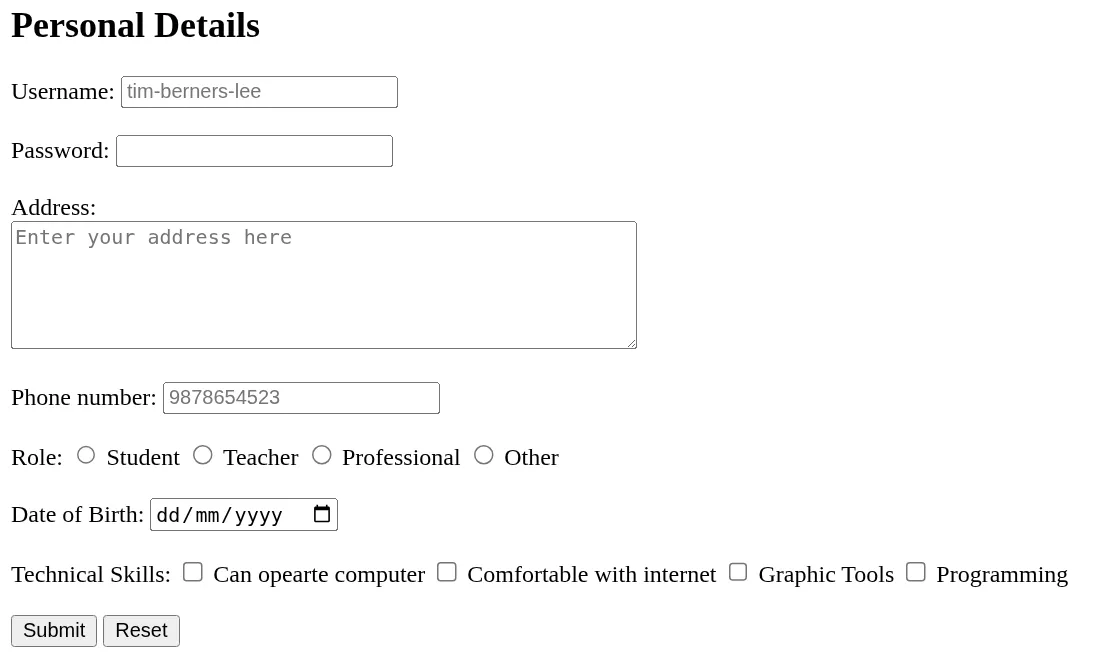
Q2.
Consider the html code snippet given below:
<!DOCTYPE html>
<html lang="en">
  <head>
    <meta charset="UTF-8" />
    <meta name="viewport" content="width=device-width, initial-scale=1.0" />
    <title>Form</title>
  </head>
  <body>
    <form>
      <label>First Name</label>
      <br />
      <input type="text" placeholder="Tim" />
    </form>
    <br />
    <form>
      <label>Last Name</label>
      <br />
      <input type="text" placeholder="Lee" />
    </form>
    <br />
    <form>
      <label>Email</label>
      <br />
      <input type="email" placeholder="[email protected]" />
    </form>
    <br />
    <form>
      <label>Password:</label>
      <br />
      <input type="password" />
    </form>
    <br />
    <button>Submit</button>
  </body>
</html>
The above code currently displays the form as shown in the screenshot below: 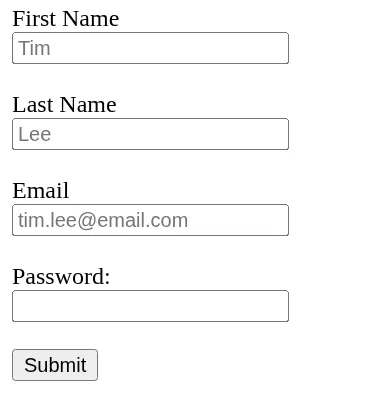
This HTML form is for collecting user’s personal Information. It currently displays content but isn’t using the most appropriate tags. Identify and fix any markup issues - improving its structure and semantics, so the form displays and functions correctly.