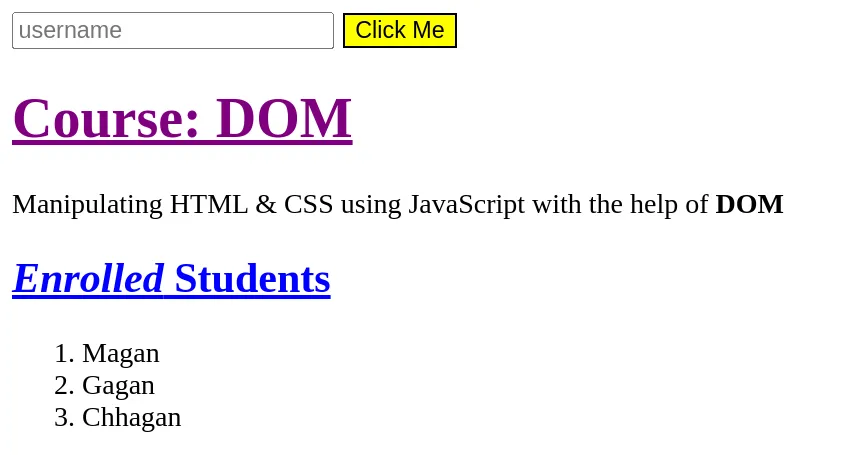
All these exercises are in continuation. Do each of them in progression after completion of the previous one.
- The initial HTML & CSS code is already given below.
- Create HTML & CSS files with code given below & link the CSS file in HTML.
- Create a JavaScript file now & link this JavaScript file with your HTML.
<!DOCTYPE html>
<html lang="en">
<head>
    <meta charset="UTF-8">
    <meta name="viewport" content="width=device-width, initial-scale=1.0">

    <title>DOM</title>
</head>
<body>

</body>
</html>
.btn {
margin: 0px 5px;
border: solid 1.25px black;
}
#clickme-btn {
background-color: yellow;
color: black;
}
#clickme-btn:hover {
background-color: orange;
}- Now add and manipulate elements on the webpage as mentioned in the below questions using only JavaScript & DOM methods.
Q1.
Create a new input and button element on the page using JavaScript only.
Set the text of button to “Click Me”.
Q2.
Now add following attributes to the element:
- Change placeholder value of
inputto “username” - Change the id of
buttonto “clickme-btn”.
Q3.
Now add class “btn” on the button created above.
Q4.
Now create a h1 element on the page and set its text to “Course: DOM” with an underline. Change its color to purple.
Q5.
Now create a p tag on the page and set its text to “Manipulating HTML & CSS using JavaScript with the help of DOM”, where “DOM” is bold.
Q6.
Now create a h2 element on the page and set its text to “Enrolled Students” with an underline, where “Enrolled is in Italic. Change its color to blue.
Q7.
Now we have certain data in the form of student names. Let’s say the name of the students are “Magan”, “Gagan”, “Lagan”, “Chhagan”. Add the names of these students in the form of an ordered list items on the webpage after “Enrolled Students” heading.
Q8.
Now let’s say the student number 3 - “Lagan” has dropped out from the course. Remove his name from the list on the webpage.
Expected Output: