Task
Imagine you’re helping a digital artist build a quick Pop-Art Collage app, inspired by Andy Warhol's famous style. The artist wants to take a favorite square photo and turn it into a vibrant 2-row by 3-column grid, where each copy is recolored in a bold, unexpected way. The goal is to let users experiment with fun color shifts and see their image transformed into a modern pop-art masterpiece.
Instructions
- Path Extraction & Placement:
- Ask the user for an image filename (or uses a default if they just press Enter) and load the selected image.
- Create a blank canvas large enough for 2 rows x 3 columns of these patches.
- Recoloring & Building the Collage:
- For each of the six grid positions, generate a recolored patch with different
(red_scale, green_scale, blue_scale)values. - Place each recolored patch into its spot on the final canvas.
- For each of the six grid positions, generate a recolored patch with different
- Finally, show the original image side by side with the processed version for comparison.
Expected Output
Original image:

Edited image:
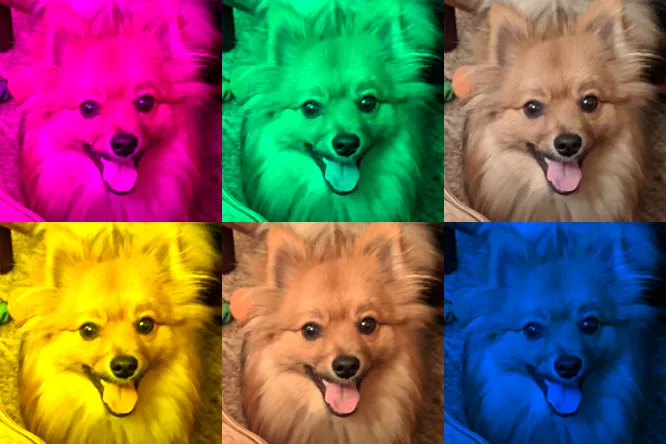
Main Lessons
- Creating blank canvases and arranging image tiles in a grid with calculated offsets
- Scaling RGB channels to recolor graphics
- Experimenting with parameterized color schemes for artistic effects
Guidelines
Feel free to implement additional features to this utility program.